Passenger Runs and City Navigation
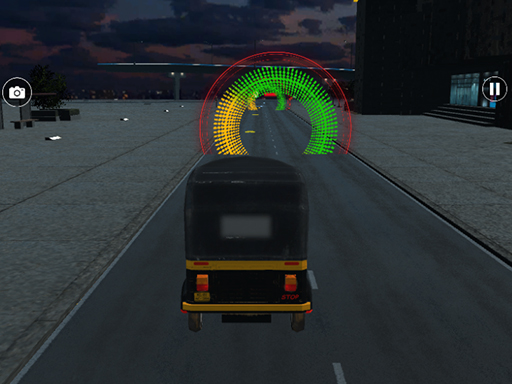
In Tuk Tuk City Driving Adventure, you play as a rickshaw driver in a lively urban setting. The core loop is simple: follow on-screen arrows to a passenger, pick them up, then drive them to the drop-off point. Traffic, pedestrians, and road barriers create the main obstacles. Each level has a time limit, so choosing a clear route matters as much as steering well. The city grows busier as you progress, but the difficulty rises gradually, keeping the experience relaxed rather than punishing.
Controls and Moment-to-Moment Driving
Steering uses either touch or keyboard inputs, with left and right controls that are easy to pick up. Braking helps you avoid sudden collisions, especially when traffic thickens. The game gives clear instructions at the start, so new players can begin without confusion. On-screen arrows constantly point toward your next objective, which keeps you focused on driving rather than hunting for destinations. The challenge comes from reading the road ahead and reacting smoothly, not from complex button combinations.
Progression and Unlockable Areas
Completing a mission awards points and unlocks new parts of the city. A progress tracker shows how far you have advanced. As you reach later stages, traffic density increases, requiring sharper anticipation of other vehicles' movements. The reward structure is straightforward: drive efficiently, finish within the time limit, and earn points that move you forward. There are no violent elements, and the bright, cheerful visuals suit players of all ages.
Who This Game Suits
This is a casual driving game aimed at people who want a friendly, low-pressure challenge. The time limits add a light sense of urgency, but the overall tone stays welcoming. If you enjoy route planning, smooth steering, and a steady difficulty curve, this game offers a comfortable fit. It is less about high-speed racing and more about careful navigation through everyday city traffic.








Comments
0 comments